OpenRhynn
 How to Play OpenRhynn
A simple beginner's guide. Here you will learn the basic controls, key mechanics, and helpful tips for OpenRhynn - the fan-made reconstruction of the j2me game Rhynn.
Where to start? PC
If you have a PC (Windows/Linux/MacOS) - we recommend installing Java and using the standard PC client. The control scheme differs from J2ME versions (including touch). The main changes are the availability of keyboard input; the left and right soft keys are mapped to the F1 and F2 keys. Basic controls are performed using the arrow keys and the Enter key.
Where to start? Android (and browser)
There is a native Android client for OpenRhynn. However, it was built a long time ago and likely will not run on modern devices. We recommend using an emulator and the J2ME (Touch) client. This client features simplified text input: select a text field and press Enter (for the browser) or the center of the screen (for Android).
What to do if the character gets stuck?
If your character is stuck, enter the command !u in the chat. GM commands can be found in the file: CommandProcessor.java
Control scheme (touch screens)
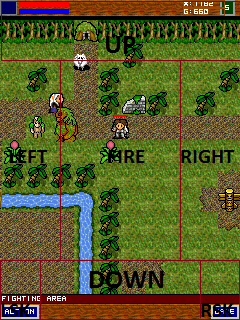
The web client and TOUCH versions use a specific control scheme. The markers in the screenshot indicate the button mapping:
- UP - up arrow
- DOWN - down arrow
- LEFT - left arrow
- RIGHT - right arrow
- FIRE - enter
The two bottom buttons on the left and right are responsible for the soft keys (same as F1 and F2 on the PC version of the client).
After selecting an input field, press FIRE (Enter) to open the text input menu (this is necessary when logging in/registering, as well as for chat).